
Corta
A fast, focused terminal. Made for Mac. Built in Swift.
Metal 4 rendering · Native CJK / IME · SSH, SFTP and remote editing
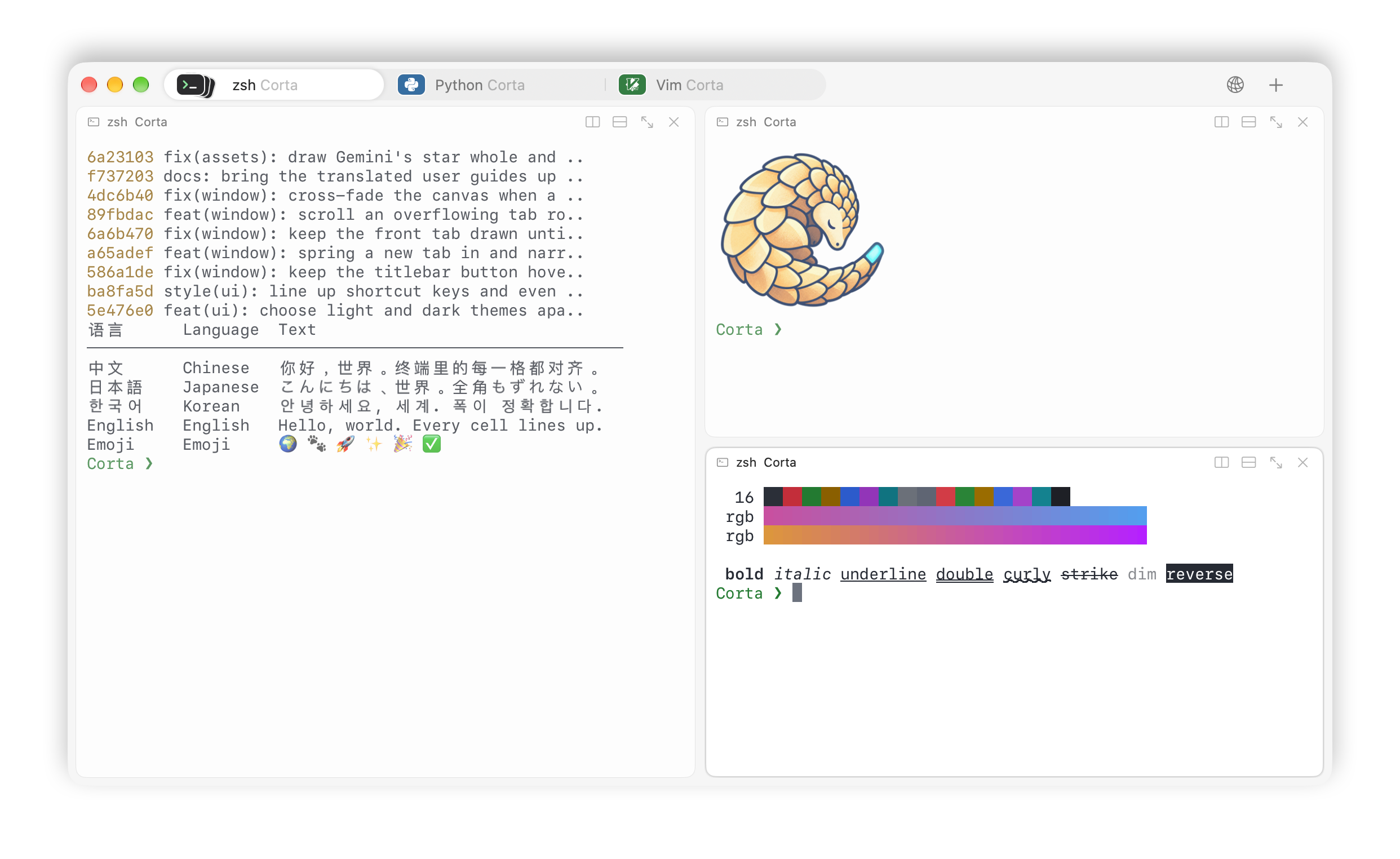
For people who live in the terminal: crisp text, native input, powerful remote workflows, and a Swift terminal core with zero third-party dependencies. Fast enough for demanding output. Thoughtful enough for everyday work.







↓ Download · Website · User guide · Documentation · Contribute · Discord · Report a bug
🇺🇸 English · 🇨🇳 简体中文 · 🇭🇰 繁體中文 · 🇯🇵 日本語 · 🇰🇷 한국어 · 🇩🇪 Deutsch · 🇫🇷 Français · 🇪🇸 Español · 🇧🇷 Português
Install
Requires macOS 26.0 or later, Apple silicon (M1 or later), and a Metal 4-capable GPU. Virtual machines with a paravirtual GPU are not supported. Intel Macs can use the older 1.0.1 release.
Download the .dmg and matching .dmg.sha256 file from
GitHub Releases.
Keep both files in the same folder and verify the checksum there:
# Replace x.y.z with the version you downloaded.
shasum -a 256 -c Corta-x.y.z.dmg.sha256
Open the disk image, drag Corta into Applications, then eject the image. Releases are Developer ID-signed and notarised. For later updates, use Corta ▸ Check for Updates… or download a newer release. Installation help and uninstall instructions are in Troubleshooting.
First steps
| To… | Use |
|---|---|
| Split right / down | ⌘D / ⇧⌘D |
| Search terminal output | ⌘F |
| Open the command palette | ⇧⌘P |
| Open Settings | ⌘, |
Standard local zsh sessions load the bundled shell-integration hooks automatically with Directory suggestions enabled (the default). For startup-file installation in zsh, bash or fish, use Settings ▸ Terminal ▸ Shell Integration; this edits your shell's startup files only when you choose Install. If an installed integration is outdated, choose Update and open a new shell. See the shell-integration guide for details.
Why Corta
| Native Mac input | CJK input and IME composition, Core Text font fallback, VoiceOver, Secure Keyboard Entry, Services and Shortcuts actions — through AppKit, not around it. |
| Fast, with evidence | 2.3× the core throughput of 1.1, a frame less of full-screen input latency, and 11 MiB instead of 185 MiB for 100,000 lines of history. Every figure is published with its method and its gaps (below). |
| Remote work built in | System OpenSSH with your ~/.ssh/config, a Finder-like SFTP browser with drag and drop, and remote files opened in your local editor with a conflict check before upload. |
| One settings file | The native Settings window and ~/.config/corta/config edit the same store; automated checks keep the documented keys and shortcuts aligned with the code. |
| Small core, serious safeguards | A Swift terminal core with no third-party dependencies, resource limits for untrusted output, and a sandboxed image decoder; the app adds only Sparkle for updates. Clipboard reads and title queries are deliberately absent (security model). |
Split panes, scrollback search, true colour, OSC 8 links, the Kitty keyboard
and graphics protocols, shell integration and restored layouts are all
there; the feature reference lists everything, with
requirements and limitations, and describes main — a published release
may not have every item yet. How Corta compares with iTerm2 and Ghostty,
and when to pick one of them instead, is in
Features → How Corta compares.
For coding-agent task state, the development tree currently integrates
Claude Code only; other tools have generic protocol support and process
detection, not dedicated state adapters (scope and limits).
Developed and acceptance-tested with Claude Code 2.1.310: interactive OSC 7501 state, with
explicit channel selection for Claude message text. tmux, Claude background
sessions and disabled terminal-title reporting have separate restrictions;
full live lifecycle acceptance is not implied by parser coverage.
Corta's macOS-only scope and its exclusion of tmux control mode, built-in
AI and a scripting engine are settled decisions;
ordinary tmux sessions run inside Corta as terminal programs.
Make it yours
Settings are stored in ~/.config/corta/config. The native Settings window
and the text file edit the same configuration.
theme = midnight
theme.midnight.inherit = solarized
theme.midnight.dark.background = #101018

bind.equalize-panes = ctrl+cmd+e
bind.command-palette = cmd+shift+p
View ▸ Theme editor… opens color pickers and separate light/dark previews. Settings ▸ Appearance ▸ Cursor selects block, bar or underline and an independent blink switch; the default is a nonblinking block. System Monospaced is the only supported primary font, with adjustable size and system fallback for missing characters. Settings ▸ Terminal ▸ Bottom status bar enables selectable local metrics (default off); click it for host details, or use View ▸ Local host details…. See the personalization tutorial for the steps, network-interface selection and thermal-state limitations.
The configuration reference lists every key, default and when changes take effect. The user guide walks through every feature and where to find it.
Build from source
git clone https://github.com/noah-qin/Corta.git && cd Corta
swift test --package-path CortaTerminal                     # the terminal core, no app
xcodebuild -project Corta.xcodeproj -scheme 'Corta (Dev)' build  # a development app beside your installed Corta
The contributor guide has the requirements (macOS 26,
Apple silicon, the Xcode in .xcode-version), local
signing and a map of the repository; the testing guide
says which check each change needs.
Quality, with evidence
Corta is under active development and has known issues. These measurements are snapshots, not guarantees for every machine or workload. Each row says which release it was measured on.
| Check | Recorded result | Measured on | Evidence |
|---|---|---|---|
| Core feed throughput (parser, grid and scrollback; no PTY or rendering) | 317.3 MiB/s, up from 137.2 | 1.2 vs 1.1 | Performance §5.14 |
| Parser + grid throughput | 355.9 MiB/s, up from 158.0 | 1.2 vs 1.1 | same |
| Scrollback memory, 100k × 120 lines | 11.4 MiB, down from 185 | 1.2 vs 1.1 | Performance §5.6 |
| Region scroll, CPU a frame, p50 | 0.026 ms, down from 0.130 | 1.2 vs 1.1 | Performance §5.14 |
| Frame CPU, 120 × 40 full rebuild, Release | 0.37–0.39 ms | 1.2 | Performance §5.17 |
| Keypress to glass, full screen, one pane, 60 Hz, a person typing | 49.1–50.8 ms p50, 82.9–84.2 ms p99 (was 64–68 ms p50) | 1.2 | Performance §5.17 |
| Idle CPU, Release, 20 seconds | 0.05% | 1.0.0 (2026-09-18); not re-run since the idle-wakeup work in 1.2 | Performance |
| esctest2 | 131 passed, 334 known bugs, 102 failed; 567 total | 1.1.5 (2026-10-07) | Raw results |
Measured on an Apple M5 MacBook Air (macOS 27.0.1); the 1.2 rows between 2026-10-09 and 2026-10-13, each before/after pair on the same machine and toolchain. The dated sections of Performance hold the conditions, every run and what a figure does not establish. The esctest2 82.0% figure sometimes quoted counts passes plus known bugs and is not a pass rate; see conformance for interpretation.
Known limitations include keypress-to-glass latency above the one-frame target in a window (full screen with one pane comes closest), incomplete VT conformance, bundled shell integration for zsh, bash and fish only, and direct-transmission-only Kitty graphics. The limitations reference has the details.
Find your way around
| I want to… | Start here |
|---|---|
| Learn every feature and where it lives | User guide |
| Configure Corta | Configuration |
| Understand a feature or limitation | Features |
| Diagnose a problem | Troubleshooting |
| Move over from iTerm2, Ghostty or Terminal.app | Coming from another terminal |
| See what is planned, or suggest something | Open issues · Discussions → Ideas |
| Find something to work on | Good first issues · Help wanted |
| Make a first contribution | Contributing |
| Run or add tests | Testing |
| Understand the code | Architecture · Core API |
| Read the full documentation | Documentation index |
Contribute
Bug reproductions, documentation, translations, accessibility testing and code contributions are welcome. Start from a good first issue or a help wanted one, and read CONTRIBUTING.md for setup and review expectations. Community participation follows the Code of Conduct.
Tried Corta and went back to your old terminal? That is worth hearing too: the Went back form needs no reproduction, and "it just felt off" is an acceptable answer.
Report vulnerabilities through the private security channel. To chat with other users and the maintainer, join the Discord. For usage questions whose answers others should be able to find, go to Discussions → Q&A; to share a theme or a setup, Show and tell. For other problems, open an issue.
Sponsor
Corta is built and maintained by one person, in the open. If it has become part of your day, a sponsorship keeps it moving — every amount helps.

Contributors
Thank you to everyone who has contributed to Corta.


License and identity
Source code is licensed under Apache 2.0. The Corta name, pangolin mascot and app icon have separate terms in NOTICE. The pangolin's curled body forms a C; its cyan tail is a terminal cursor. Brand assets include the mascot and social preview.